If you’re wondering why everyone suddenly has dozens of podcast clips and social media shorts pulling millions of views, it is not because they have a video editing wizard in their basement. They’re probably using a tool like OpusClip.
In this Opus Clip review, we break down how the tool actually works and where it delivers real results.
Should You Even Do Short-Form Videos?
For a long time, growing on social media meant focusing on long-form videos. In the past few years, short-form content has quickly become one of the most widely consumed video formats online.
Most viewers don’t always have the time or attention for long videos. Shorts deliver quick, digestible value in a few seconds. Platforms like YouTube Shorts also surface short-form content to new viewers more easily, which can help with overall visibility and reach.
For founders, DevRel teams, and small marketing teams inside early-stage devtools or SaaS companies, short-form is one of the most practical ways to get more value out of the long-form content you’re already making. You can turn one recording into multiple posts without extra production work or a dedicated editor.
Opus Clip Review: What Is Opus Clip
OpusClip is an AI-powered tool that identifies moments in your long-form videos that it predicts will be engaging and turns them into short clips ready for YouTube, TikTok, Instagram, and other platforms.
It helps you repurpose longer recordings into multiple short-form videos, saving time on reviewing footage, trimming clips, and adding basic visual elements.
But there’s a trap here. Convenience can create a false sense of productivity. Just because you can post more clips does not mean those clips will perform well.
Why Most People Fail at Content Creation
Many people assume their idea is strong and only needs to be posted for the algorithm to notice. The harsh truth is that no tool or posting schedule can fix weak content.
If your videos lack clarity or value for the viewer, posting more of them won’t help. Publishing high volume with low substance is the fastest way to stall your growth.
This is why OpusClip can be misleading. It helps you produce more content, but speed alone doesn’t create results.
Is OpusClip Actually Useful?
Yes, but only if your source content is already strong.
When your long-form recordings include clear ideas, energy, and value, OpusClip can help you turn those moments into clips that perform well. The tool becomes most useful when you know what it can and cannot do.
How to Use OpusClip Effectively
OpusClip has strengths and limitations. Knowing when to rely on it and when to polish a clip manually will help you get the most out of the tool.
A common question we hear from founders and small teams is: “How do we create short-form videos consistently without hiring an editor?” OpusClip is often the simplest answer.
1. Saving You Time in Editing
Manual editing requires scrubbing through long recordings to find moments that feel right. OpusClip speeds up this process by identifying potential highlights automatically.
If your original content isn’t engaging, OpusClip can’t fix that. It surfaces the best moments you created, but it can’t turn a weak recording into strong clips.
2. Crafting Effective Hooks
OpusClip detects potential hook moments by looking at high-energy language, emotional tone, and keyword importance. This works well for content with clear structure and obvious highlights.
Where it struggles is nuance. If your content relies on build-up, technical steps, or deeper context, Opus AI clips sometimes feel incomplete.
Here’s a quick comparison:
| Your Video Type | Can OpusClip Make Effective Hooks? | Why? |
|---|---|---|
| Deep-dive educational videos | Maybe | Clips may miss needed context or earlier explanations. |
| Storytelling | Yes | Stories have clear structure and emotional peaks. |
| Technical tutorials or walkthroughs | Maybe | Hooks may miss key screen references or steps. |
| Live reactions | Yes | High energy and emotional spikes are easy for the AI to detect. |
| Hot takes | Yes | Strong statements produce clean openings. |
| Product reviews or breakdowns | Maybe | Clips may skip essential visuals or contextual details. |
3. Creating the Visuals for Your Clips
OpusClip includes several tools that help create polished short-form videos.
Auto-Reframing
OpusClip adjusts horizontal videos into vertical format and offers layout options such as:
- Fill: Crops the video to fill the vertical frame.
- Fit: Shows the whole horizontal frame without cutting important elements.
- Split / Multi-person layouts: Useful for interviews, panels, or podcasts.
- Screenshare layouts: Attempts to detect screen-sharing moments and place the screen and speaker in a balanced layout. Detection is helpful but not always perfect.
Animated Subtitles
- Caption style presets
- Font adjustments
- Highlight colors
- Animation options
- Text position and line limits
OpusClip generates subtitles automatically and lets you customize them through:
Brand Templates
OpusClip lets you create templates with your logo, fonts, colors, and layouts for consistent future clips.
What to Keep in Mind
Opus Clips AI defaults to a very animated, TikTok-style aesthetic. If you want something cleaner and more professional, you’ll want to adjust the caption style, simplify fonts, and limit zooming.
This is especially important for devtools or SaaS audiences who expect more polished visuals.
Opus Clip Review: How OpusClip Worked for Us
At Stateshift, we tested OpusClip directly by converting long-form videos into short-form clips. The results were clear.
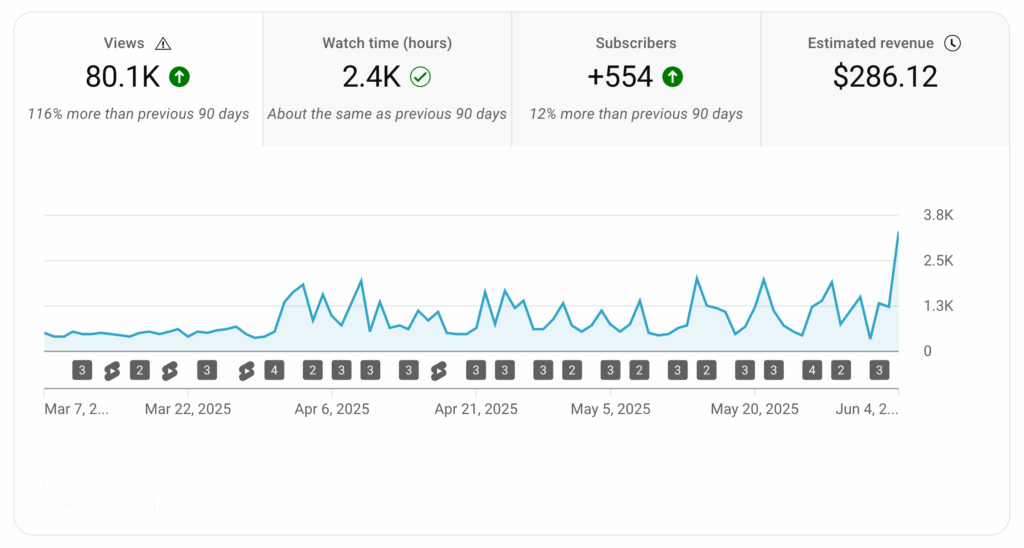
After posting OpusClip-generated clips, we saw a noticeable increase in views. The volume and clarity of the shorts helped the algorithm surface our content more consistently.
Is Opus Clip AI Expensive to Use?
OpusClip uses a credit-based system where one credit equals one minute of video processing. This can be cost-effective for founders or small teams compared to hiring an editor for every clip.
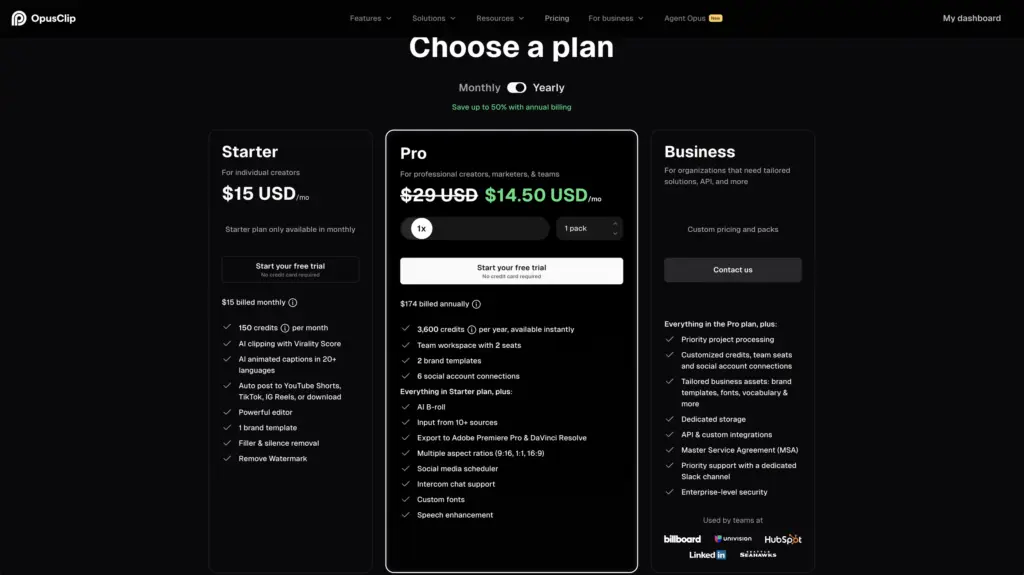
Features may vary slightly with platform updates, but the pricing tiers generally include:
- Free: Enough credits to test short-form formats.
- Starter: Good for individual creators producing shorts consistently.
- Pro: More credits, shared workspaces, and deeper customization.
- Business: Designed for teams managing multiple brands or larger volumes.
Is It Better Than Manual Editing?
Here is how OpusClip compares to manual work:
| Your Editing Situation | Is It Better Than Manual Editing? | Why? |
|---|---|---|
| Posting lots of content quickly | Yes | Saves hours of reviewing, clipping, and captioning. |
| Clear, simple, high-energy videos | Yes | Easy for OpusClip to detect strong hooks. |
| Basic or simple editing needs | Yes | Automates most repetitive tasks. |
| Story-driven or nuanced content | Not Ideal | May cut needed context or misunderstand transitions. |
| Highly polished or branded edits | Not Ideal | Manual editing offers more control and customization. |
| Subtle humor or niche references | Not Ideal | AI may miss context or meaning. |
Many teams use a hybrid approach. OpusClip identifies potential clips, then an editor adds custom visuals or branding.
Who Should and Should Not Use OpusClip?
OpusClip is ideal for founders, lean marketing teams, and DevRel teams who need consistent content output without spending hours editing.
If your content relies on context, storytelling build-up, or stylized visuals, manual editing remains the better option.
OpusClip Final Thoughts
OpusClip is a powerful tool, but it is not magic. It saves time, finds potential hooks, and produces clips quickly. Its effectiveness depends on the quality of your original content and how thoughtfully you use it.
If your long-form content is clear, structured, and valuable, OpusClip can help you reach more people faster.
And, if you want practical advice on content and growth, especially for founders and small teams, consider subscribing to our newsletter, ShiftSignal. It’s a weekly dose of practical techniques, tips, templates, and more for how to build a movement around your company, products, and projects.
FAQ
Is OpusClip worth using?
Yes. Based on our testing, OpusClip is worth using if you create long-form content and want to repurpose it into ready-to-post shorts. It saves time on editing, detects potential hooks, and helps you publish consistently. It won’t fix weak content, but it can amplify strong recordings.
How does OpusClip compare to manual editing?
OpusClip is much faster than manual editing because it automates clipping, captioning, and formatting. Manual editing still wins when your content requires polished visuals, storytelling context, or custom motion graphics. Many small teams use it to find clips, then do final polish manually.
How can I create effective short-form videos on a budget?
You don’t need a full production setup to get started. Tools like OpusClip let you create clips in minutes at a low cost. For founders, DevRel teams, and small marketing teams, this is one of the easiest ways to stay consistent without hiring an editor.
Which types of videos work best with OpusClip?
Storytelling, live reactions, product demos, interviews, and high-energy commentary work best. Deep-dive tutorials and technical walkthroughs can still work, but OpusClip may miss important screen references or context.
Can teams use OpusClip?
Yes. Teams can share workspaces, brand templates, and clip settings. This makes OpusClip a good fit for early-stage SaaS companies, DevRel teams, and small marketing teams who need to repurpose videos quickly.
How long before results appear?
Clips can be created instantly, but performance depends on your posting frequency and platform algorithm. Most teams see engagement patterns emerge within 7-14 days when posting shorts consistently.
What visual and branding features does OpusClip include?
OpusClip offers auto-reframing, animated captions, brand templates, split-screen layouts, and AI-generated B-roll. You can customize fonts, colors, layouts, and animations to match your brand style.
Which OpusClip plan should I choose?
Start with the Free plan to test short-form workflows. Upgrade to Starter if you post regularly, or Pro if you’re part of a team and need more credits and customization. The Business tier is best for companies managing multiple brands.
What types of teams get the most value from OpusClip?
OpusClip works best for small marketing teams, founders, and DevRel groups that need to repurpose long-form videos quickly. If you don’t have an editor or you need consistent output with limited time, OpusClip removes most of the repetitive work so you can publish short-form content more often.
Want to know more about Opus Clip AI? Check out Jono’s breakdown below.