
The homepage gets traffic. Developers sign up. Then almost none of them run the first command, make the first API call or finish the quickstart. Somewhere, a roadmap meeting gets scheduled. At Stateshift, we’ve worked with 250+ developer-focused companies, and we hear the same line from founders and DevRel leads all the time: “Developers don’t respond to our marketing” or “We’re getting signups but nobody converts.”
In our read, that line is often a problem in developer messaging dressed up as a channel problem. A developer arrived, read the page, and couldn’t tell what the product does, or the messaging just didn’t resonate with their needs.
Is messaging really the problem?
It’s easy to miss from the inside. Your team reads your copy already knowing the answer, so every sentence feels clear. And a lot of homepage copy is written for the person approving the budget, not the person who has to install the thing. The developer is the one who decides whether to keep reading, and they decide fast. Nielsen Norman Group found that users often leave web pages within 10 to 20 seconds, though that research dates from 2011, so treat it as a rule of thumb and not a developer benchmark.
The takeaway isn’t that developers are impatient. It’s that your page has to earn the rest of the read in the first few seconds.
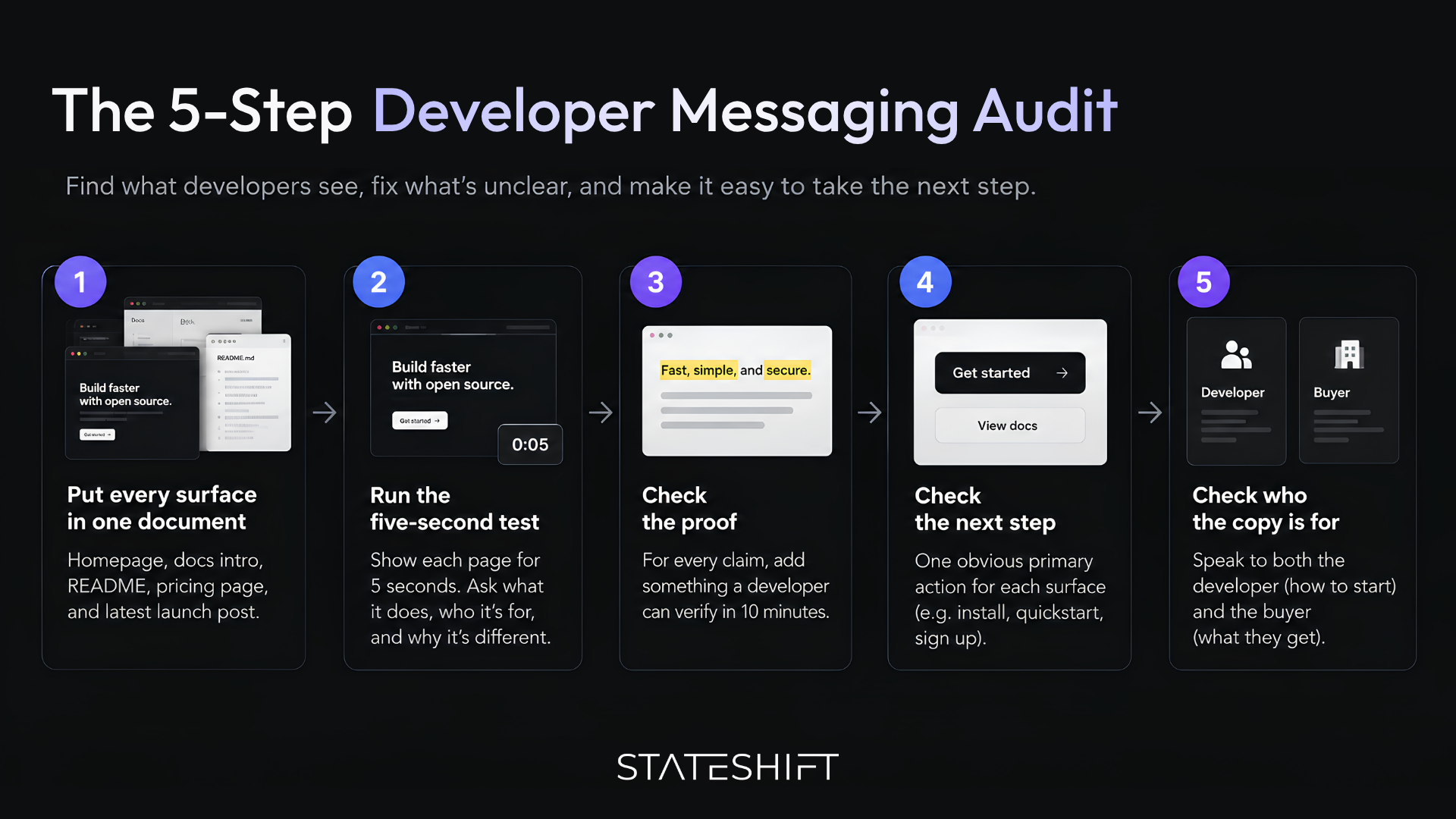
So how do you find out whether your messaging is the problem? You can guess, or you can run a short audit. This post walks through one you can finish in an afternoon with a shared doc and three people who don’t work on your product. I’ll be upfront about its limits. It is a practical method, not a formal framework, and it won’t fix a product that is hard to use. If the product is the problem, fix that first.
The five-step audit
One rule before you start: judge every surface the way a stranger would, not the way your team would. That is what makes the audit work, and it’s also what makes it a little uncomfortable.
You’ll score five surfaces against five checks, and every check is pass or fail. I know half marks feel kinder. In practice, “mostly clear” is how teams talk themselves out of fixing things.
Step 1: Put every surface in one document
List the five places developers are most likely to meet your message first:
- your homepage
- your docs intro (the getting started page)
- your README
- your pricing page
- your most recent launch post
Open each one in a private window so you see what a stranger sees, then paste the headline and first paragraph into one doc, side by side. Don’t forget the places that render your words for you. A package registry page usually shows your README as its main text, a repository page shows the README plus a one-line description, and a search result shows a title and a snippet. Developers often meet those before they ever load your homepage.
The docs intro earns its place on the list. In the Stack Overflow Developer Survey 2026, 58.9% of respondents said they use technical documentation to learn.
You pass this step when:
- all five surfaces are in the doc
- someone owns each one
You fail when you can’t find a surface, or nobody knows who owns it. A README nobody owns counts as a fail.
Here’s what you’ll often find once everything is side by side: the homepage calls the product a platform, the README calls it a library, and the docs intro calls it a toolkit. Nobody chose that. Nobody noticed it, either. It happened one update at a time, and nobody was responsible for keeping the descriptions consistent.
Step 2: Run the five-second test
This is the heart of the audit, so give it the most time. The five-second test is an established usability method. You show someone a page for five seconds, then ask what they remember. In that time, a user should understand the value proposition and the main functionality.
Here is how to run it well:
- Pick three people who don’t work on your product. Developer friends are ideal. Your co-founder is not, because they can’t unsee the answer.
- Screenshot the top of the page as it looks on a laptop. Show it for five seconds without letting anyone scroll, then hide it.
- Ask three questions before any discussion starts: What does this do? Who is it for? Why is it different?
- Write down the answers word for word. Don’t help, don’t hint, and don’t explain until you have them on paper.
I’ll admit the pass bar here is a judgment call. This is mine: if two of the three can’t say what the product does in their own words, the surface fails. You pass when most testers give a similar, correct answer to the first question. You fail when the answers scatter, or when they describe a category you don’t want to be in.
A headline like “The next-generation platform for modern teams” fails, because it could describe almost any product, so every tester fills the gap with a different guess. A headline that says what the product does in plain words, such as “Automatically retries failed webhooks,” gives testers something they can repeat back.
Supabase shows how much one line can matter. The team changed its tagline from “Realtime Postgres” to “The Open-Source Firebase Alternative,” and when someone shared it on Hacker News, it went to the top. A developer who reads “Firebase alternative” knows right away what to compare it to. One line won’t fix every page, but a clear one can do a lot before anyone reads further.
Keep the exact phrases your testers use. Once you explain the product, someone will usually say it back in a sentence that is clearer than anything on your site. That sentence is often better copy than what you have now, and it’s free.
Step 3: Check the proof
Underline every claim on the surface: fast, simple, scalable, secure. Next to each one, write what a developer could verify in ten minutes. That might be a command to run, a benchmark with its method, a link to the relevant docs, a public repo, or a sandbox they can try without talking to anyone.
Developers lean toward what they can check. In the Stack Overflow survey, 48.0% of respondents said they trust AI output when they can easily verify it. That figure is about AI tools, not vendor claims, so read it as an analogy and not as evidence about your homepage. It still points the same way: verifiable beats asserted.
You pass when every claim has something a developer can check. You fail when it’s adjectives with nothing behind them. Adjectives are cheap to write and expensive to believe.
Here is what the swap looks like:
- “Set up in minutes” becomes a short command a developer can paste into a terminal, plus a line describing what they should see afterwards.
- “Enterprise-grade reliability” becomes a link to a public status page and a docs page that spells out the reliability policy in plain terms.
- “Blazing fast” becomes a benchmark with its method, or it gets cut. A claim nobody can check is worse than silence, because it makes the rest of the page sound like marketing.
Step 4: Check the next step
Count the calls to action on each surface, then ask what a reader there should do next. On a README that is usually the install command. On the docs intro it is the quickstart. On a homepage it depends on whether you are asking for a signup, a trial or a conversation, and you should pick one. Secondary actions are fine as long as they look quieter than the primary one.
You pass with one obvious primary action that fits where the reader is. You fail with three equal buttons, or none. Five equal buttons isn’t a call to action. It’s a menu.
The failures look like this:
- a homepage with five buttons of equal weight, so the visitor has to decide what you want them to do
- a README that opens with contributing guidelines before the install command
- a docs intro that simply ends, leaving the reader to hunt through the sidebar for the next page
The fixes are small: one prominent button with the rest demoted to links, the install command first, and a single closing line that points to the quickstart.
Step 5: Check who the copy is talking to
Read each surface twice. First read it as the founder who signs the invoice, then as the developer who has to install and run the thing. Copy written for the buyer promises outcomes with no mechanism. Copy written for the developer skips why any of it matters. The developer’s version of the question is practical: what do I change in my stack, and what happens in my first hour?
You pass when the surface tells the developer what to do first and tells the buyer what they get. You fail when it only does one of those.
A line like “reduce downtime and protect revenue” works for the budget holder and tells the developer nothing about the effort involved. Adding one sentence about supported languages and what changes in setup gives the developer the missing half without taking anything away from the buyer.
How do you decide what to fix first?
You now have a grid of five surfaces and five checks. Count the fails per surface, then fix in this order:
- The homepage and the docs intro, because that is where first impressions form.
- The README.
- The pricing page.
- The launch post. Don’t rewrite the old one. Fix the pattern in the next one.
Within a surface, fix failed five-second tests before failed proof checks. Proof doesn’t help if the reader can’t tell what you do.
One honest caveat. This is hard to do on your own product, because you know too much. Use outside readers, and write down what they actually say before you change a word.
What should you do today, and when is it worth getting a second opinion?
You don’t need the full afternoon to learn something. Here is how to start today:
- Pick the one page that gets the most traffic. For most teams that is the homepage.
- Screenshot the top of it as it looks on a laptop.
- Show it for five seconds to three people who don’t work on your product, and ask what it does, who it’s for and why it’s different.
- Write their answers down word for word, then compare them with what you meant to say.
If the answers scatter, you have your answer on whether messaging is part of the problem, and you know which page to fix first.
Some results are a sign to bring someone in: every surface fails the five-second test, or your fixes keep stalling because nobody owns them. Stateshift offers a free Blind Spot Call, where we look at your website, product and developer engagement and share where we’d focus first.
Common Questions On Developer Messaging
How do I audit my developer messaging?
Start by getting everything in one place. Put your homepage, docs intro, README, pricing page and latest launch post into a single document. Then run a five-second test on each with three people who don’t work on your product, and check every surface for proof, a single next step and who the copy is written for. Score each check pass or fail. It’s not glamorous work, but for five surfaces and three outside readers, an afternoon is enough.
How do I know if my product messaging is hurting developer adoption?
We look for three signs. People sign up but few reach a first success. Testers describe your product as three different things. And your homepage, README and docs each describe it in different words. These point to messaging, but they don’t prove it, so we’d rule out a hard-to-use product before rewriting a headline.
How do I optimize product messaging for better adoption?
Fix the homepage and docs intro first, because that’s where first impressions form. Within a page, fix failed five-second tests before failed proof checks. Borrow the words your testers used to describe the product, and give each page one obvious next step. Small fixes made in that order go a long way.
How can a technical company build developer trust through its messaging?
Give developers something they can check for themselves. That might be a command to run, a benchmark with its method, a public status page or a public repo. Cut the claims nobody can verify, and write for the developer’s first hour with the product, not only for the person approving the budget.
When should a technical company bring in a partner to audit its messaging?
When every surface fails the five-second test, or your fixes keep stalling because nobody owns them. Run the audit yourself first, so you can show a partner what testers actually said. And if you’d like a second set of eyes, we offer a free Blind Spot Call to look at your site and your developer engagement.