
Picture the week your DevTool team’s latest YouTube video goes live. For days, someone has been rewriting the script, someone has been cutting footage, and someone has been fighting with the thumbnail until it finally looks right. The team hits publish, refreshes the page a few times, and waits for the algorithm to do its thing.
A few days later, the numbers are low. The team gathers in Slack, and the conversation is short: “That one didn’t land. Let’s try a different idea.” Someone drops a new topic into the content calendar, and the whole cycle starts again. Nobody opens YouTube Studio. Nobody asks why people didn’t click, why they left, or why YouTube stopped showing the video to new viewers.
I understand how it happens. When a video takes this much work, a low number feels personal, and moving on feels like the healthy response. But it is also an expensive one. All that effort produced something that could have told the team exactly how to make the next video better, and nobody read it. DevTool YouTube metrics are that signal.
I’ll admit that tracking metrics feels overwhelming at first. There are a lot of numbers, and the algorithm can feel like a black box. The good news is that two numbers will get you most of the way there.
Why YouTube metrics are the next step after you publish
Go back to that Slack thread for a second. The team treated a low-view video as a bad idea. But a low-view video can be a good idea with a packaging problem, or a strong title on top of a video that loses people in the first minute. Those two problems need different fixes, and view count alone can’t tell you which one you have.
Metrics answer three questions that views can’t:
- Why was this video weak? Did people not click, or did they click and leave?
- Why didn’t the algorithm push it? YouTube is responding to how viewers behave, and the metrics show you that behavior.
- Which specific part do we improve? The title and thumbnail, the opening, the middle, or the topic itself.
Without those answers, every new video is another roll of the dice. With them, the next video is an informed attempt instead of a guess. So which numbers should you look at?
How to read CTR and retention rate
It’s easy to feel lost the first time we open YouTube Studio after a video underperforms. There are charts everywhere, and it’s hard to know which one deserves attention. We already made the case for why CTR and AVD are the two metrics to watch in Is YouTube Worth It For DevTools Companies?, so this post picks up after you publish and shows you how to read each number.
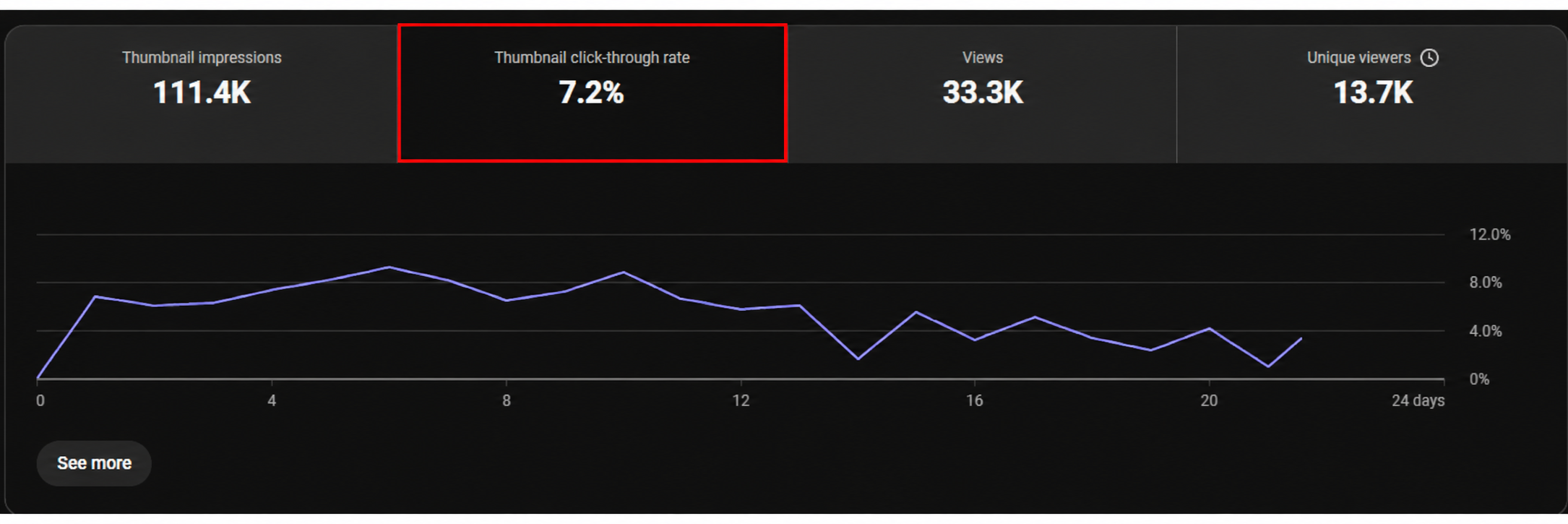
Click-through rate (CTR) answers this question: of the times your video showed up on someone’s YouTube page, how many people clicked? Those appearances are called impressions, so CTR is clicks divided by impressions.
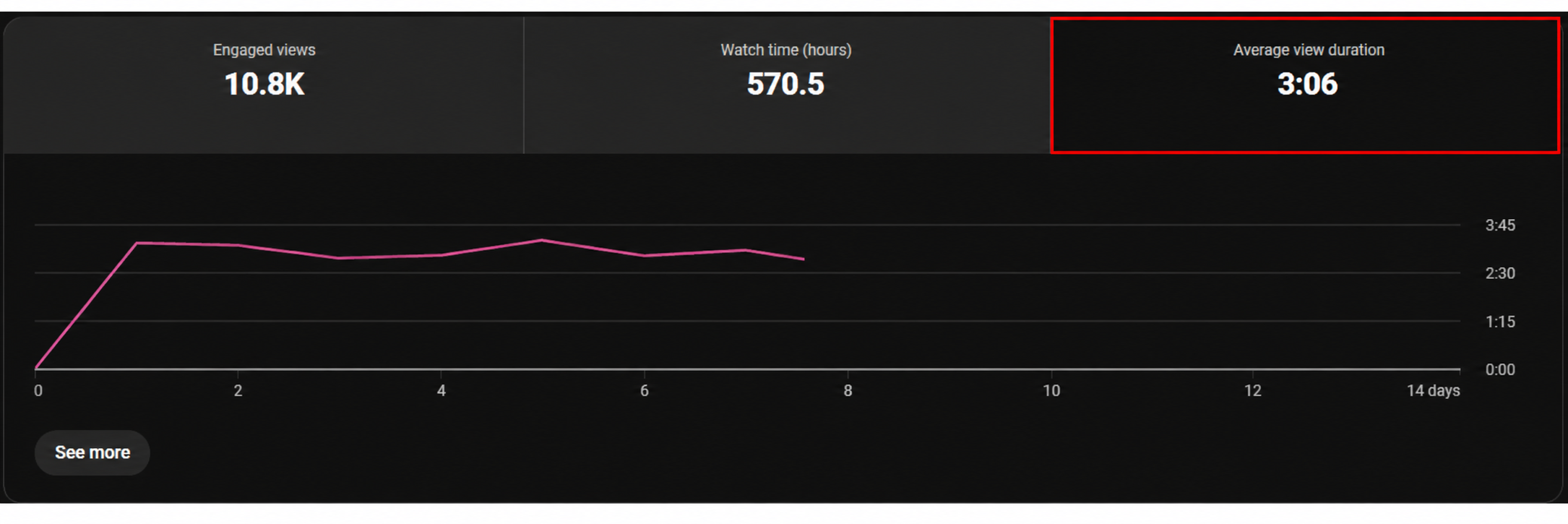
Average view duration (AVD) answers the next question: of the people who clicked, how long did they stay? AVD is reported in minutes, but the number to track is retention rate, which is AVD as a percentage of the video’s total length. A 15-minute video with a 5-minute AVD has a retention rate of 33%.
YouTube’s own team points to these two numbers as well. In a Creator Insider episode on how important CTR and AVD are, Patricia, a product manager on YouTube Analytics, explained why YouTube chose average view duration: how much time someone spends with your content is a really strong indicator of interest.
How YouTube decides who sees your video
The first people to see your video aren’t strangers scrolling past. YouTube starts with the people most likely to care, and from there the video has to keep earning its audience. Here is the simplified version:
- Round one is your warm audience. YouTube first shows the video to subscribers and viewers whose interests line up closely with the topic. It watches how they respond, using CTR and AVD.
- If the numbers are strong, the audience widens. YouTube pushes the video to people who are less closely aligned with your channel and tests again.
- If it keeps winning, it widens again. When the video still gets a high CTR and high AVD and keeps people on the platform, YouTube moves it to an even bigger, colder audience.
Each round the video wins is rewarded with a bigger and colder audience, which is how impressions and distribution grow. The way to win rounds is to improve CTR and AVD.
You don’t choose who sees the video. You do control whether people click on it and whether they stay once they do.
How CTR works: packaging is the first step
CTR comes first because everything else depends on it. If few people click, few people watch, then AVD has almost nothing to work with. What drives CTR is packaging, meaning the title and the thumbnail. A strong thumbnail is high quality, clear, and built around curiosity, on a topic your audience cares about. A strong title is not boring or purely informational. It is worded creatively enough to trigger a real emotional response.
When our founder, Jono Bacon, finished his documentary-style video about how a printer helped shape open source, we could have simply packaged it as “How Open Source Was Made.” That title is accurate, but it doesn’t give anyone a reason to click.
We wanted to invoke curiosity, so we made viewers wonder how something as random as a printer could be connected to something as important as the history of open source. That is how we landed on a title that raised the stakes: “How a Printer Changed Open Source Forever.”

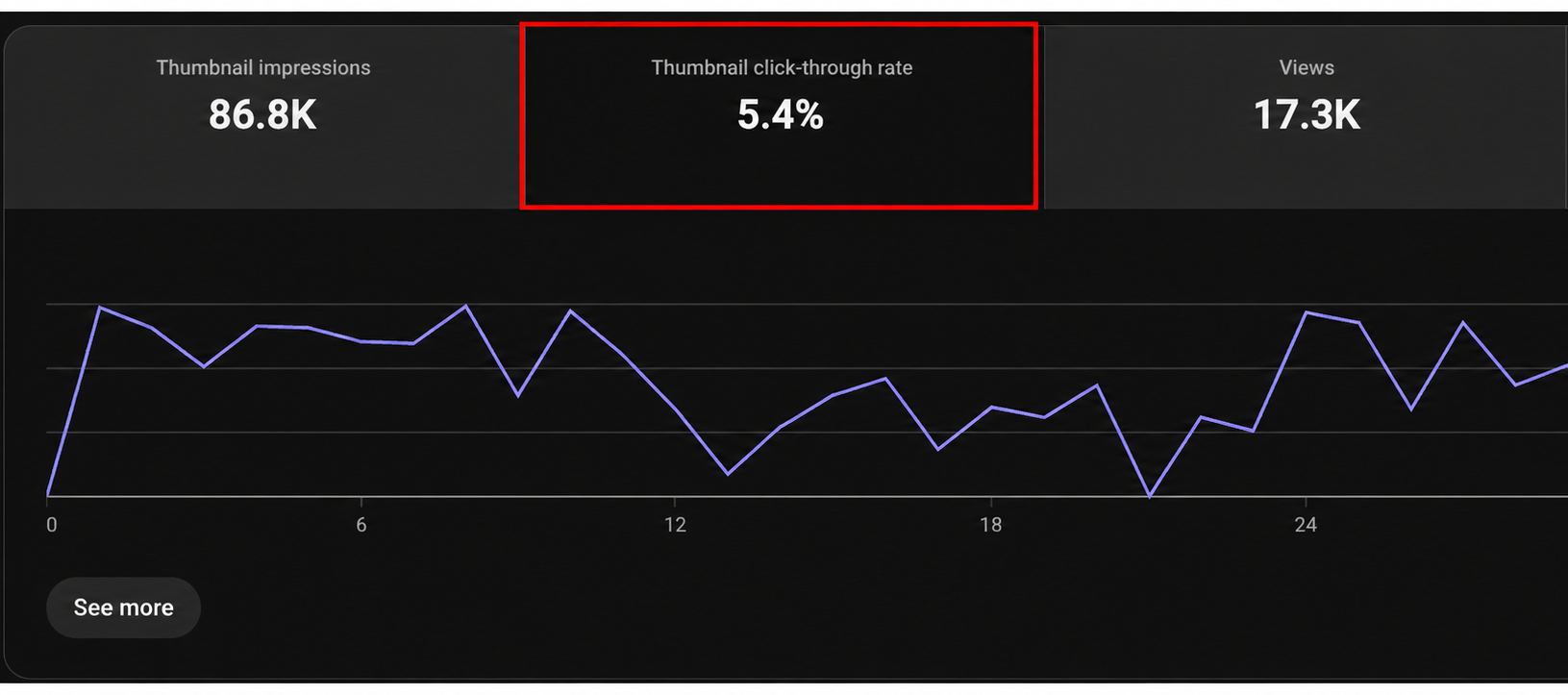
The video earned 17,000 views and a 5.4% CTR, higher than the channel’s average at the time, which hovered between 1% and 3%. That view count is around 32x our channel’s old view average.
If you want to see an in-depth look into how we used data-driven research in creating the concept and packaging behind this one, we recommend to look at our post on choosing DevTool video ideas.
How AVD works: keep viewers watching
A video can win the click and still lose the viewer. Someone sees a title they can’t resist, clicks, and leaves a few seconds later because the video didn’t deliver on the promise. YouTube notices, because its goal is to keep people on the platform as long as possible. A video that holds viewers is rewarded with wider distribution on top of a strong CTR.
Raw AVD is hard to compare across a channel. If you move from 5-minute videos to 20-minute videos, AVD goes up on its own because the ceiling is higher. To judge more accurately on whether a video resonated, look at retention rate instead, which is the video’s AVD divided by its total length.
The printer video is a good example. It runs 5 minutes 54 seconds, and its average view duration is 2 minutes 44 seconds, which is just under half of the video at 47.67%. That is a high retention rate for the platform, and one reason the video did so well.
The audience retention graph in YouTube Studio gives you the detail behind that number. It shows what percentage of viewers were still watching at each point in the video, and you want a line that stays as flat as possible from start to finish.
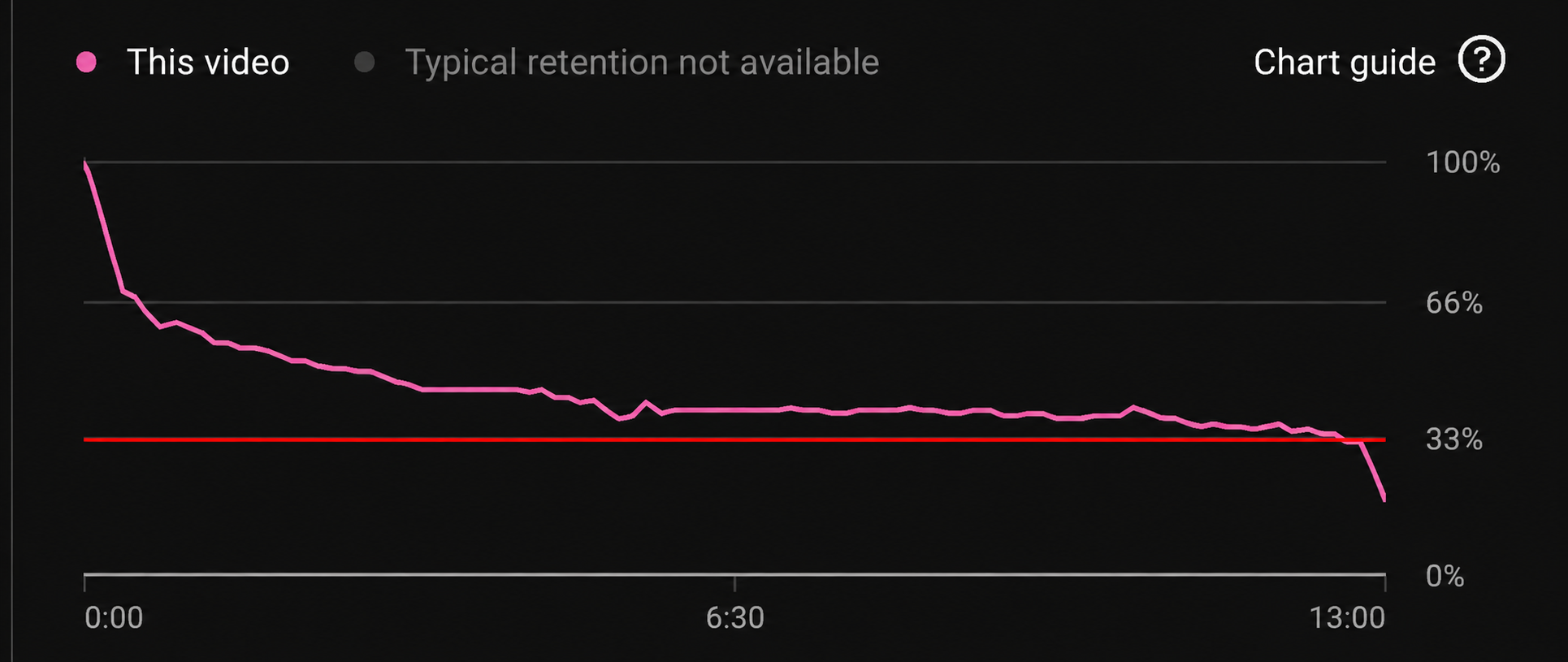
A line that slopes down steeply means viewers dropped off as the video went on.
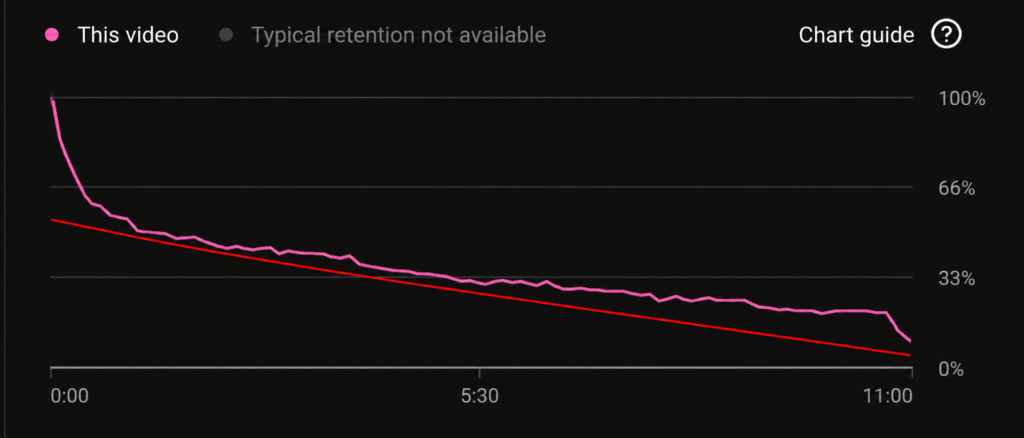
Here is how to use it:
- Open the retention graph for the video and find the points where the line dips or drops.
- Bring that moment to the team and ask what happened there. It could be the script, the effects, or something that simply isn’t working.
- Fix that mistake in your next video, and check the graph again.
The YouTube metrics diagnostic checklist
Eventually you pull up a video where the CTR looks healthy, but the retention graph falls off a cliff. What do you do with that? Tracking all of this is hard at first, because you are learning several metrics and connecting them to each other. Here is the checklist we’d use to turn two numbers into a decision. Check your video’s CTR and retention rate, then find the situation that matches.
- Low CTR, high AVD. The video itself is good, because the people who clicked stayed. The packaging needs work, so improve the title and thumbnail.
- High CTR, low AVD. The packaging worked and people clicked, but they didn’t find a reason to stay and dropped off. Improve the video itself, starting with the places where the retention graph falls.
- Low CTR, low AVD. Overhaul the topic and the video strategy. The topic may not be relevant even to your core audience, or the audience you are targeting may not be a good fit.
If both numbers are high, note what you did and repeat it.
What counts as high or low
Your next question is probably what “high” and “low” mean. There is no universal answer, and a published benchmark is only a sanity check. YouTube’s own Help Center says half of all channels and videos have an impressions CTR between 2% and 10%. That range is wide, which is why the right comparison is your own channel.
The way to get that comparison is to calculate your averages in small batches. Take your last five videos and work out the average CTR and average retention rate. That is your benchmark for judging whether a new video is over or underperforming.
Here is what that looks like in practice:
- If your average CTR is 3% and a new video gets 5%, that is a good sign your packaging is improving.
- If your average CTR is 9% and a new video gets 5%, it is underperforming. Work out what made it weak and what to change so the next one catches up to or beats your average.
Track a five-video rolling average
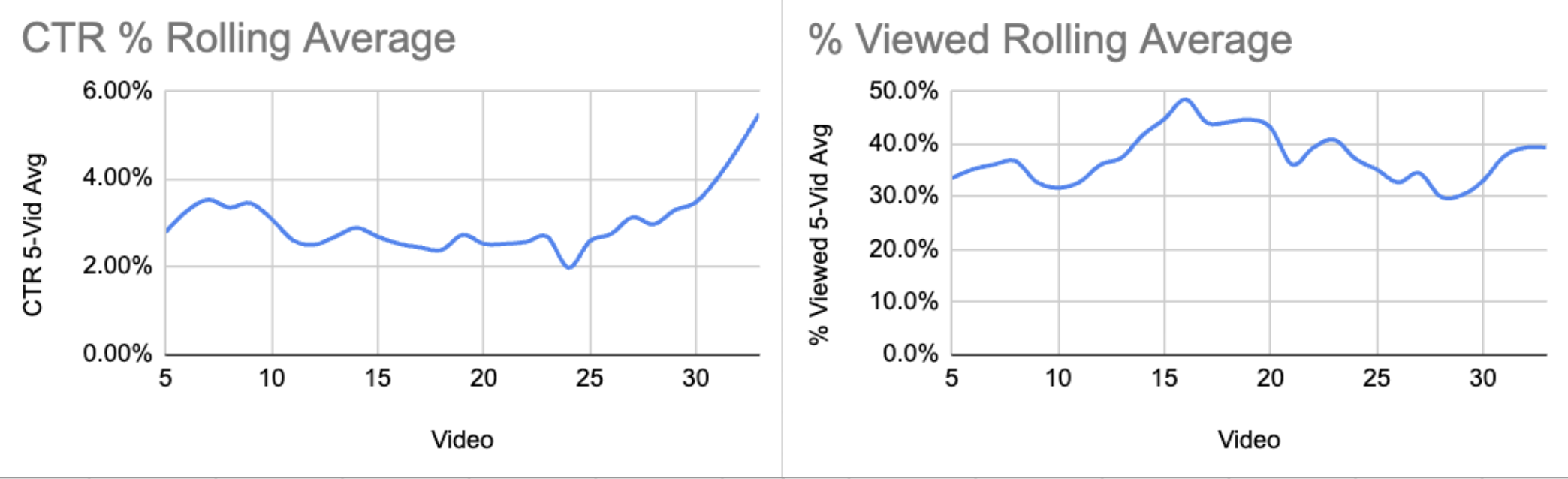
Here is how we’d keep this up: a five-video rolling average in Excel or any spreadsheet.
- Create one row per video, with columns for CTR and AVD.
- Calculate the average CTR and average AVD for your five most recent videos, and chart both.
- When you release a new video, drop the oldest one from the batch and add the new one.
- Recalculate, and compare the new video to the updated average before you decide what to change.
Why a rolling window instead of your whole channel? A channel-wide average mixes your recent work with older videos from weeks, months, or years ago, and their performance can be erratic. That dilutes what you are doing now. A rolling average reflects only your most recent efforts, so you can see objectively whether you are improving and make clearer decisions. Overall channel metrics are still useful for tracking growth, but keep a focused, recent view alongside them.
Your next step
Now give that team in Slack a different ending. Someone opens YouTube Studio, pulls the CTR and retention rate for the last five videos, and drops them in a sheet. They compare the newest video to the averages, match it to one of the three situations above, and agree on the single thing to change in the next one.
That is your next step too. Do it after every upload, and YouTube stops being a guessing game and becomes a process.
Common Questions On DevTool Youtube Metrics
Our team keeps publishing videos, but we can’t tell whether they’re working. What should we do?
Pull each new video’s CTR and retention rate and compare them to your last five videos. Stateshift uses a simple three-scenario diagnostic: low CTR with high retention means fix the title and thumbnail, high CTR with low retention means fix the video itself, and low on both means rethink the topic.
What is a good CTR and retention rate for a DevTool YouTube video?
There is no universal number. YouTube’s Help Center says half of all channels and videos have an impressions CTR between 2% and 10%, so the better benchmark is your own channel’s last five videos. If your average CTR is 3% and a new video gets 5%, your packaging is improving, and the same comparison works for retention rate.
How do I track whether my developer content is improving over time?
Use a five-video rolling average in Excel or any spreadsheet, with one row per video and columns for CTR and AVD. When you release a new video, drop the oldest one and recalculate. A rolling window reflects your recent work, so older videos with erratic performance don’t dilute the picture.